Twitch is using channel content to train generative AI models and you’ve been opted in by default! If you’re like me, you got the ick reading that. Not to worry. You can OPT OUT of participating in Twitch’s generative AI training models in your User Settings.
Here’s how:
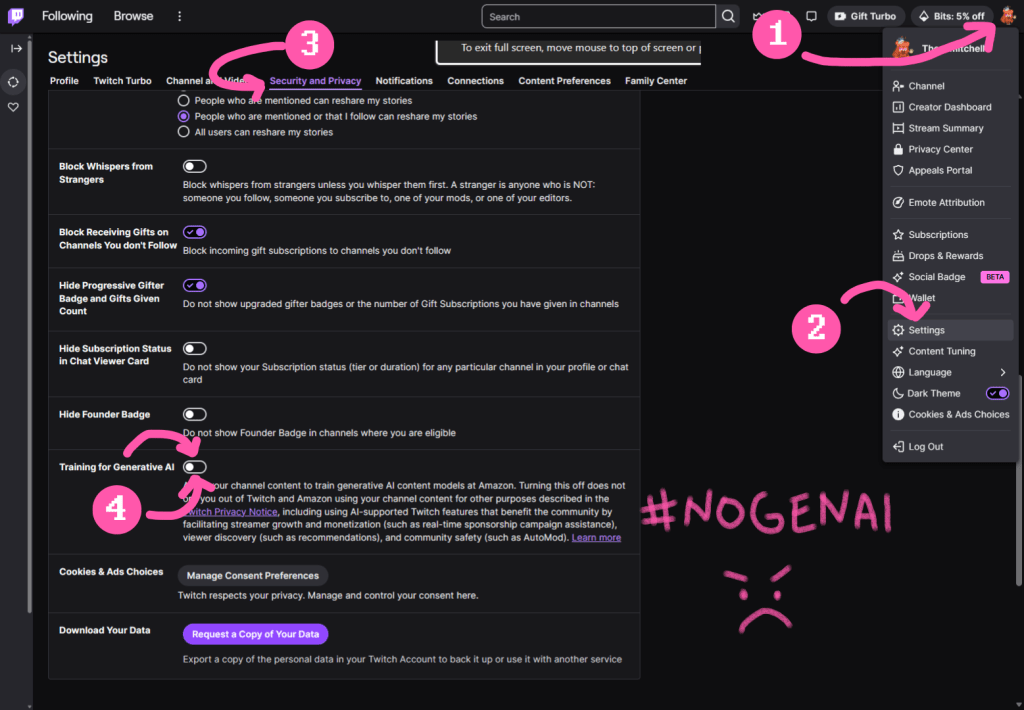
- Log in to Twitch
- Go to Settings > Security & Privacy
- Scroll to the bottom and turn off Training for Generative AI
- Tell your friends!
If you’re on mobile and can’t find the setting, you may need to do this on the web. There’s a handy image below that shows you where to find all the things.
Even if you don’t stream, you can still opt out on Twitch to help send a message to Amazon and Twitch that we don’t want to participate in generative AI. Not now. Not ever! #NoGenAI #OptedOutOfGenAI
Smitch’s Handy OPT OUT graphic